
Compared with traditional cross-border e-commerce platforms, XOOBAY leverages cutting-edge technology and model innovation to build multi-dimensional competitive barriers. Its core advantages focus on six key areas, creating a more efficient and flexible transaction ecosystem for global trade participants:
1. Blockchain-Driven Economic System: The original XOO Token economic model realizes full-link certification of transaction data based on blockchain technology, ensuring clear ownership of assets and transparent circulation. Meanwhile, it provides users with diversified value return channels such as token appreciation and scenario-based applications.
2. Integration of Metaverse Immersive Experience: Breaking the limitations of traditional online transaction scenarios, XOOBAY integrates metaverse technology into platform operations. It builds virtual brand exhibition halls for sellers to realize 3D product displays and interactive marketing, and creates immersive shopping scenarios for buyers to enhance the transaction experience.
3. Flexible Onboarding Cost Plan: Abandoning the fixed high onboarding fee model of traditional platforms, XOOBAY customizes tiered cost plans based on merchants' business scale, product category attributes and cooperation levels, significantly reducing the onboarding threshold and operational pressure for small and medium-sized merchants as well as individual entrepreneurs.
4. Intelligent Advertising Promotion System: Based on AI algorithms, it builds accurate user portraits and provides merchants with "one-to-one" advertising strategies. This realizes the efficient matching of marketing resources and target customer groups, significantly improving advertising conversion rates and return on investment.
5. Standardized Brand Authorization Mechanism: It establishes a global brand qualification review and authorization cooperation system, strictly controlling brand access standards. This not only protects the intellectual property rights of brand owners but also provides buyers with authentic product traceability guarantees, building a trustworthy transaction environment.
6. Diversified Cross-Border Payment Support: Integrating global mainstream payment channels and covering multi-currency real-time settlement, it solves the pain points of exchange rate fluctuations, delayed fund arrival and high handling fees in traditional cross-border payments, ensuring the safe and efficient flow of transaction funds.
Through the above innovative measures, XOOBAY not only provides sellers and buyers with more flexible transaction options and optimized solutions but also takes technology empowerment and model innovation as the core. It opens up a new track for the future development of cross-border e-commerce and promotes the upgrading of the global digital trade ecosystem.
It is recommended to use the Google Chrome browser to ensure a stable network environment. Prepare the following materials in advance:
Valid email address (for registration and verification)
Personal/enterprise identification documents (for KYC verification: individual users need to prepare ID card/passport; enterprise users need to prepare business license and legal representative identification)
Common payment account information (for binding payment channels)
Shipping address information (for order delivery on the buyer side; sellers can supplement it as needed)
1. Official Website Access and Account Registration
Open the Google Chrome browser, enter the official domain xoobay.com in the address bar to access the XOOBAY global official website. Click the "Register" button at the top right corner of the page to enter the registration page and fill in the following information accurately:
Enter a valid email address (it is recommended to use a corporate email or common personal email to ensure normal email reception)
Set a password that meets security standards (it is recommended to include uppercase and lowercase letters, numbers and special symbols, with a length of no less than 8 characters)
Fill in necessary contact information (such as mobile phone number, for subsequent account security verification)
Read and check the XOOBAY Platform User Service Agreement and Privacy Policy, then click "Submit Registration".
2. Account Verification and Activation
After submitting the registration, the system will automatically send an account verification email to the email address you filled in. (If you do not receive it, you can check the spam folder or click "Resend Verification Email" on the registration page.) Open the verification email and click the exclusive activation link in the email to complete the account verification. (The link is usually valid for 24 hours; if it expires, you need to reapply.)
3. Basic Account Settings
Log in to your XOOBAY account using the verified email/mobile phone number, enter the "Account Center - Account Settings" page, and complete the following basic configurations:
Personal Information Completion: Fill in real name/enterprise name, contact address and other information as prompted on the page (the information must be consistent with the subsequent KYC verification materials).
Security Settings: Set security questions and answers, and enable two-factor authentication (2FA) to improve the account security level.
Payment Method Configuration: Enter the "Payment Management" module, bind the common payment account (supporting global mainstream payment channels, and complete account association and verification as prompted).
Shipping Address Addition: Buyer users enter the "Address Management" module, fill in the detailed shipping address (including postcode and contact information), and multiple common addresses can be added.
New User Task Participation: After logging in, new users can participate in new user tasks (such as completing information and binding payment methods) in the "New User Center". After completion, they can immediately receive platform token rewards (tokens can be used for in-platform consumption deductions, advertising placement and other scenarios).
4. KYC Identity Verification
To activate core functions such as product release and transaction settlement, you need to complete KYC (Know Your Customer) identity verification. The specific process is as follows:
Enter "Account Center - Verification Management" and select "Individual Verification" or "Enterprise Verification".
Upload the corresponding certification documents as prompted by the system (individual users need to upload scanned copies of the front and back of the ID card/passport; enterprise users need to upload copies of the business license, legal representative identification and bank account opening permit. The documents must be clear and free of alterations, and the supported formats are JPG and PNG).
After submitting the verification application, the platform will complete the review within 1-3 working days. The review result will be notified via email and in-platform message.
If the review fails, the specific reason will be informed, and you can supplement the materials according to the prompts and resubmit.
5. Completion of Onboarding and Activation of Functions
After the account verification and KYC verification are passed, the system will automatically unlock the core functions of the platform:
Seller Users: Can enter the "Merchant Center" to release products, set store information and configure marketing activities, officially starting store operations.
Buyer Users: Can directly browse platform products, place orders for purchases, query order status and enjoy cross-border shopping services.
To support individual entrepreneurs and small and medium-sized enterprises in quickly launching cross-border businesses, XOOBAY has launched the "New Merchant Onboarding Support Program", with the following core preferential policies:
1. Deposit Waiver: Newly onboarded merchants (including individual and enterprise users) are exempted from store deposits for the first 3 months. From the 4th month onwards, deposits will be paid according to the platform standards (specific standards can be found in "Merchant Center - Fee Description").
2. Traffic Support for New Merchants: In the first month of onboarding, new merchants can receive free exposure resources of the platform's "New Merchant Recommendation Position" to help stores quickly accumulate initial traffic.
3. Operational Guidance Services: New merchants can freely participate in the "Cross-Border E-Commerce Operation Training Courses" organized by the platform, and obtain full-link operational guidance on product selection, marketing, logistics and other aspects.
To ensure the platform's service quality and the sustainable development of the cross-border transaction ecosystem, XOOBAY has formulated a clear and transparent transaction fee system for seller users, with a core transaction fee rate of approximately 10%. The specific description is as follows:
1. Applicable Scenarios of Fees: This rate applies to each product transaction completed by the seller on the platform. The calculation base is the actual transaction amount of the order (excluding cross-border logistics fees and payment channel handling fees).
2. Composition and Advantages of Fees: The 10% transaction fee integrates multiple service costs such as platform technical services, cross-border transaction guarantees and global traffic support. Compared with the "basic rate + additional service fees" model of traditional cross-border e-commerce platforms, it effectively reduces the comprehensive operational costs of sellers.
3. Fee Settlement Method: Transaction fees will be automatically deducted from the seller's order collection amount after each order is completed (the buyer confirms receipt and there is no after-sales dispute). The deduction details can be checked in real time in "Merchant Center - Financial Statements - Transaction Flow", ensuring transparent and traceable fees.
XOOBAY Global is always committed to providing global users with safe, convenient and efficient cross-border digital asset transaction services. Relying on blockchain technology to ensure transparent and traceable transactions, it has established a 7×24-hour customer service team to promptly respond to user inquiries and feedback. It continuously optimizes platform functions and service experiences, helping every user seize business opportunities and achieve growth in the wave of global digital trade.
Welcome to visit the official website xoobay.com and start your cross-border e-commerce journey!
Business Cooperation: bizcoop@xoobay.com
Customer Support: support@xoobay.com
Media Cooperation: media@xoobay.com
URL: https://www.xoobay.com
Email: info@xoobay.com
Address: Unit 1051, Building 19W, HKSTP, Sha Tin, Hong Kong
[url_lang] => /help/registration-guide ) ) ) [1] => Array ( [id] => 2 [name] => Points and Wallet [list] => Array ( [0] => Array ( [id] => 44 [name] => XOO Points [author] => XooBay [group] => 43 [cate] => 2 [status] => 1 [sort] => 20 [view_cnt] => 1190 [img_logo] => [desc] => [lang] => en [url] => xoo-points [seo_key] => XOO Points, XOO Token, XOOBAY staking, crypto rewards, burn mechanism, membership benefits, ecommerce points [seo_desc] => Maximize your XOOBAY experience with XOO Points! Learn about Cash & Staking accounts, earn competitive staking rewards, understand the token burn, and unlock exclusive buyer/seller benefits. [meta_title] => [meta_desc] => [meta_key] => [add_time] => 1759929973 [add_user] => 0 [remark] =>① Point Cash Account: Used for recharging and consumption. A 5% XOO handling fee will be deducted when withdrawing to a wallet, and this fee will be directly burned.
②Point Staking Account: Supports transfers to/from the Cash Account and provides staking returns for different terms.
The total burning quota is 2 billion XOO Tokens
① Withdrawal: 3%-5% dynamic burn (determined by transaction volume; Higher monthly volume → lower burn rate, lower volume → higher burn rate)
② Burning rules: The 5% XOO handling fee deducted when withdrawing points to a wallet will be directly burned.
③ Add Order Consumption Burn: each order additionally burns 1%-2% XOO,
④ Increasing long-term value Platform Point Spending Rewards: up to 5% of product value per order can be offset.
⑤ Seller Point Incentive: 2%-10% of product value discount (set by seller)
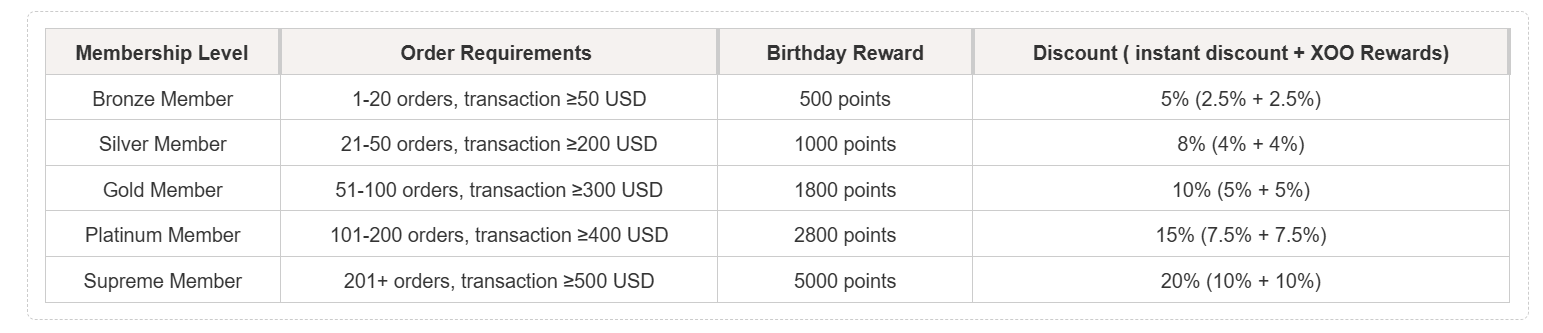
① For example: If you are a Gold Member, you can enjoy 10% benefits = 5% instant discount + 5% XOO reward.
② When you purchase an item worth $100 USD: Instant discount: 5% = $5 USD,Actual payment: $95 USD. After the transaction is completed, you will receive an additional 5% XOO points reward = XOO points worth $5 USD.
③ In other words: You pay $95 USD + receive $5 USD worth of XOO points (XOO points can be withdrawn.) The seller will also reward corresponding 5% XOO points.

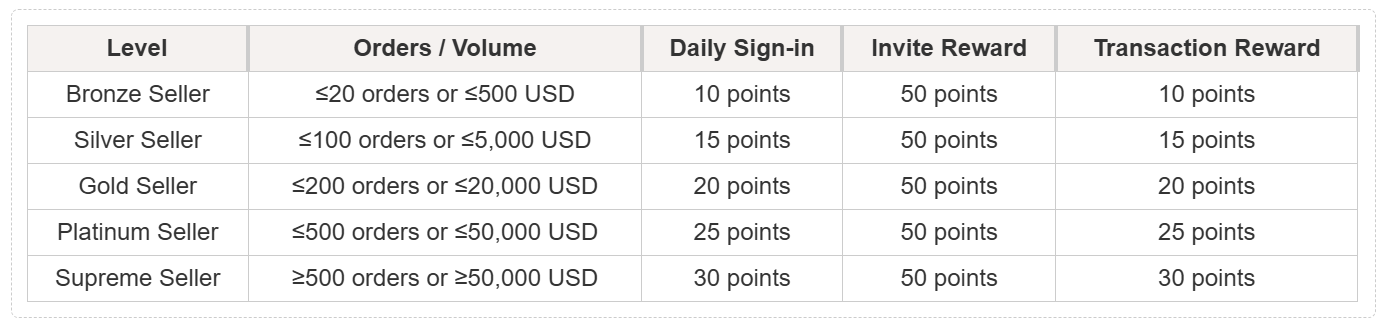
Sellers can configure incentive mechanisms to increase product visibility and drive sales through user engagement behaviors, including likes, favorites, comments, and shares.
[url_lang] => /help/xoo-points ) [1] => Array ( [id] => 38 [name] => XOO Wallet [author] => XooBay [group] => 37 [cate] => 2 [status] => 1 [sort] => 20 [view_cnt] => 1348 [img_logo] => [desc] => [lang] => en [url] => xoo-wallet [seo_key] => XooWallet, XOO Token, multi-chain wallet, digital asset management, crypto wallet, BiFinance, Polygon, NFT [seo_desc] => Discover XooWallet, the secure multi-chain digital asset management platform for the XOO ecosystem. Learn how to download, register, manage assets (send, receive XOO, USDT), and trade XOO Token on BiF [meta_title] => [meta_desc] => [meta_key] => [add_time] => 1759907900 [add_user] => 0 [remark] =>Welcome to XooWallet – the exclusive unified account system for the XOO ecosystem, dedicated to providing global users with secure and efficient multi-chain digital asset management services.
XooWallet is a multi-chain asset management wallet that integrates NFT nodes, airdrop features, multilingual options, and payment password settings. It is also equipped with AI customer service. With MATIC top-ups ensuring secure and efficient transfers, it offers global users a convenient digital asset management experience.
As the core value carrier of the XOO ecosystem, XOO Token has the following core functions and advantages:
1. Multi-scenario Application: It can be used for digital product redemption, exclusive rights unlocking, and cross-border transaction fee deduction within the XOO ecosystem, covering the full-link value circulation of the ecosystem;
2. Multi-chain Compatibility Support: Relying on the multi-chain architecture of the XOO ecosystem, it supports secure circulation on major global public chains such as Polygon, ensuring the stability and convenience of asset transfers;
3. Asset Security Guarantee: Based on the decentralized nature of blockchain technology, it ensures clear ownership of XOO Token and transparent, traceable asset management.
If you need to obtain detailed full-process instructions for download and installation, asset management, troubleshooting, etc., you can directly visit the official XooWallet Help Center for systematic guidance:
Official Help Center URL: https://web.xoowallet.com
You can use the Google Chrome browser to open the official download URL: https://web.xoowallet.com to signup the XOO Wallet app, experience secure and efficient multi-chain asset management and intelligent services, and start your new digital finance journey!
XooWallet H5 Version supports Android, iOS mobile devices, and web version. The specific download paths are as follows:
1. Pre-registration Preparation
You need to prepare in advance:
A valid personal/enterprise email address (for receiving verification emails);
2. Registration Steps
Open the XooWallet web version, click the "Register" button to enter the registration page;
Enter the prepared email address and set a password that meets security standards (it is recommended to include uppercase letters, lowercase letters, numbers, and special symbols, with a length of no less than 8 characters);
Read and check the "XooWallet User Service Agreement" and "Privacy Policy", click "Get Verification Code", and enter the verification code received in the email;
(Optional) Fill in the referral code XOO888 to receive exclusive new user benefits after completing registration (you can check the benefit details in "My - Benefit Center");
Click "Complete Registration", and the system will automatically redirect to the login page.
3. Account Login & Initial Check
Find the XOO Wallet app on your mobile phone, open it, enter the username (email) and password set during registration to log in to your XooWallet account;
After successful login, enter the "Wallet" module to view your wallet balance and asset distribution.
After completing registration, you need to click the "Account Activation Link" in the email (sent to the registered email, valid for 24 hours) to activate the account;
1. Using XooWallet's Send Function
Log in to your XooWallet account and click the "Send" button in the "Wallet" module;
Select the currency to be sent (such as XOO, USDT, etc.), and carefully fill in the recipient's wallet address (it is recommended to manually enter and check again, or use the address QR code scanning function to avoid address errors);
Enter the transfer amount (note that some currencies have a minimum transfer limit) and confirm the handling fee (paid in MATIC; ensure there is sufficient MATIC in the account to cover the handling fee);
After verifying that the transfer information (currency, address, amount, handling fee) is correct, click "Send" and enter the previously set payment password to complete verification;
After submission, wait for blockchain network confirmation. Once confirmed successfully, you can view the transaction status in "Asset Details - Transfer Records".
Please note: Two conditions must be met for a successful transfer:
① There is sufficient MATIC (Polygon Chain) in the account to pay the handling fee;
② The payment password has been set in "Security Settings".
2. Using XooWallet's Receive Function (Asset Deposit)
Log in to your XooWallet account, find the currency to be received in the "Wallet" module, and click the "Receive" button;
The system will generate a unique wallet address and corresponding QR code for the currency. You can directly copy the address or save the QR code image;
Provide the copied wallet address to the payer (such as other wallet users, exchanges), and be sure to inform the other party to select the public chain consistent with your wallet address (e.g., Polygon Chain);
After the payer initiates the transfer, you can view the progress in "Asset Details - Deposit Records". Once confirmed by the blockchain network, the asset will be automatically credited and the balance will be updated.
1. Registering & Logging in to a BiFinance Account
Use the Google Chrome browser to open the official BiFinance URL: https://www.bifinance.com
Enter the registration page and choose to register with a mobile phone or email:
Mobile Registration: Enter your mobile phone number, obtain and fill in the SMS verification code, and set a login password;
Email Registration: Enter a valid email address, obtain and fill in the email verification code, and set a login password;
Read and check the "BiFinance User Agreement", click "Complete Registration", then log in to the BiFinance account using the registered information (it is recommended to complete KYC verification after login to unlock more trading permissions).
2. Initiating a Deposit to BiFinance Exchange
Log in and open the BiFinance mobile app (or web version), click the "Assets" module on the homepage, and select "Deposit";
Search for and select the "XOO" currency on the deposit page, and be sure to select the "Polygon" blockchain (it must be completely consistent with the public chain of XOO assets in XooWallet to avoid asset loss due to cross-chain deposit);
Click "Generate Deposit Address", copy the XOO deposit address provided by BiFinance (it is recommended to copy and temporarily save it in a notepad for subsequent verification);
Open your XooWallet account, enter "Wallet - XOO - Send", and paste the copied BiFinance deposit address into the "Recipient Address" field;
Enter the amount of XOO to be deposited, verify the handling fee (ensure there is sufficient MATIC in the account), click "Send" and enter the payment password to complete the transfer;
After submitting the transfer, you can view the progress in BiFinance's "Deposit Records". Once confirmed by the blockchain, the asset will be credited to the BiFinance account.
3. XOO Token Trading (Operation on BiFinance Exchange)
Log in to your BiFinance account, click the "Trading" module on the homepage, search for the corresponding "Trading Pair Asset" (e.g., "XOO/USDT") in the trading pair list, and enter the trading interface;
Select the trading type: "Limit Order" (set a target price and the order will be executed automatically when the price is reached) or "Market Order" (execute the order immediately at the current market price);
If you choose to "Buy XOO": Enter the amount of XOO to be bought (or enter the amount of USDT to be spent), click "Buy XOO", and complete the transaction after confirming the order information;
If you choose to "Sell XOO": Enter the amount of XOO to be sold, click "Sell XOO", and complete the transaction after confirming the order information;
After the transaction is completed, you can view the XOO or USDT balance in "Assets - Spot Account". If you need to transfer the asset back to XooWallet, you can refer to the "Withdraw from BiFinance to XooWallet" process (select "Withdraw" in BiFinance, fill in the corresponding currency address and public chain of XooWallet, and submit after completing verification).
As a multi-chain wallet, XooWallet currently supports the storage and management of the following mainstream digital assets: USDT, USDC, BTC, ETH, XOO (core ecosystem token), POL (Matic), BNB, SOL, ARB, AVAX, etc. More asset types will be continuously added in the future to meet diverse management needs.
1. USDT Deposit Process
Log in to your XooWallet account and enter "Asset Center - USDT - Deposit";
Select the corresponding deposit public chain (it must be consistent with the public chain of the external withdrawal account, such as Polygon Chain, ERC-20 Chain, to avoid asset loss due to cross-chain deposit);
Copy the unique deposit address generated by the system, paste it into the external account (such as an exchange, other wallet), enter the deposit amount, and submit;
Wait for blockchain network confirmation (usually 1-2 minutes, depending on the congestion of the public chain). Once confirmed, the asset will be automatically credited, and you can check it in "Asset Details".
2. XOO Token Purchase Guide (Supplementary Instructions)
Currently, XOO Token can be mainly purchased through the BiFinance Exchange. In addition to the associated operations mentioned above, if you encounter purchase issues, you can contact BiFinance's official customer service or XooWallet's support team for assistance.
3. XOO Token Contract Address (Important Information)
To ensure the security of asset deposit/withdrawal, the official contract address of XOO Token (Polygon Chain) is as follows. Please be sure to verify the address during transfer to avoid asset loss due to incorrect address.
XOO Token (Polygon Chain) Contract Address: 0xcf2d710d8ebeb62e67a4e50e9933551121c2316e
4. Asset Withdrawal Operation (Transfer XOO/USDT to External Account)
Log in to your XooWallet account and enter "Asset Center - Corresponding Asset (e.g., XOO/USDT) - Send";
Enter the external receiving address (such as BiFinance Exchange address, other wallet address), and confirm that the public chain of the address is consistent with the public chain of the asset in XooWallet;
Enter the withdrawal amount, verify the withdrawal handling fee (the handling fee is subject to the real-time blockchain network fee; if insufficient, you need to top up MATIC first), and submit after confirming it is correct;
Complete the account security verification (such as SMS verification code, two-factor authentication code). After submission, you can view the progress in "Asset Details - Withdrawal Records".
You can submit an inquiry through the " help@xoobay.com " email to us. We will reply within 1-2 working days;
Notes: When inquiring, please provide a clear description of the problem (such as operation steps, error screenshots, account registration email) to facilitate quick problem location and resolution.
Official Cooperation: info@xoobay.com
Customer Support: help@xoobay.com
The XooWallet team will continue to optimize product functions and service experience. We wish you a efficient and secure digital asset management experience in the XOO ecosystem!
[url_lang] => /help/xoo-wallet ) ) ) )